How to Use Canva for Branded Story Highlights
How to Use Canva for Branded Story Highlights
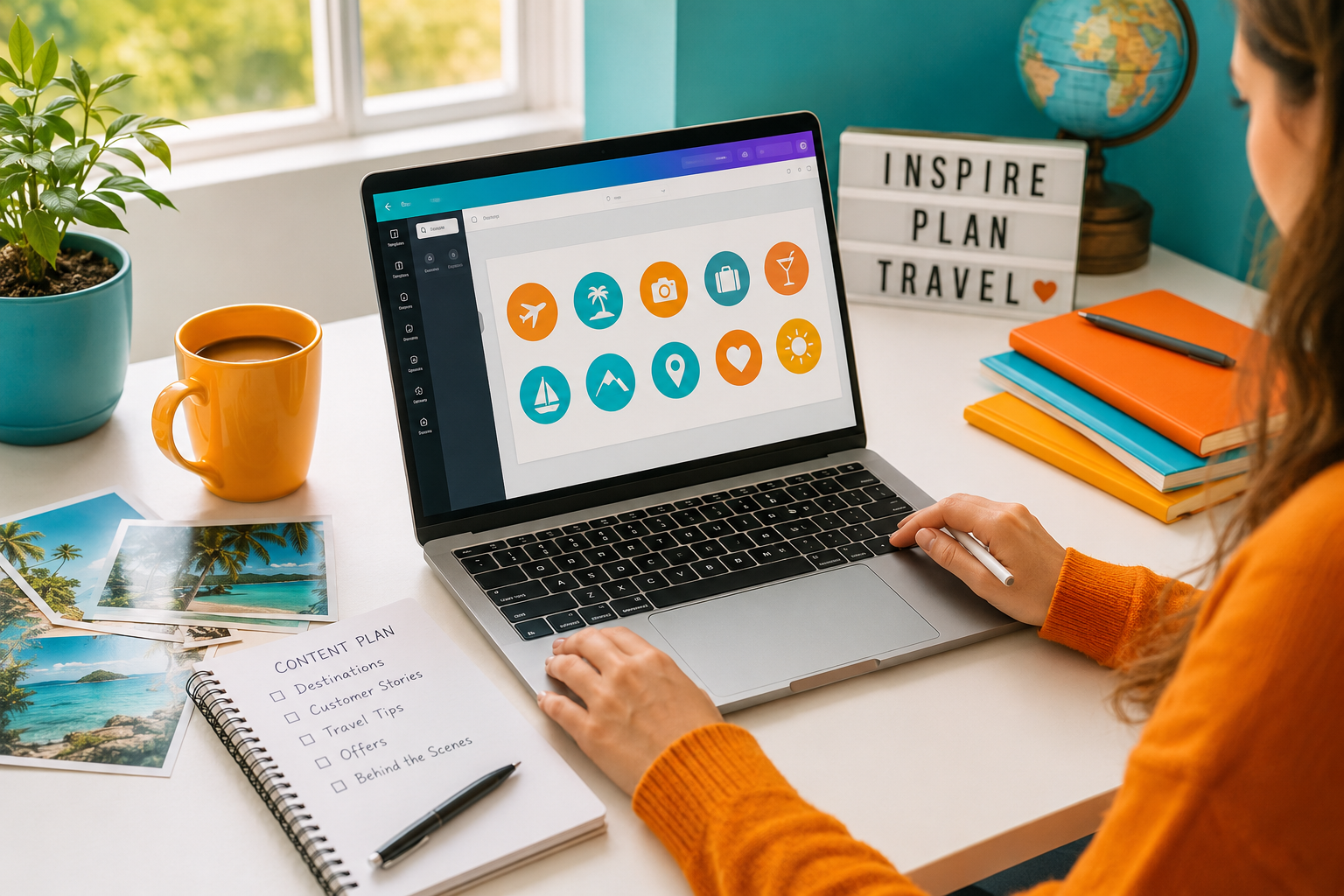
Canva story icons travel businesses use well can turn a busy Instagram profile into a clear, welcoming guide for potential clients. For a travel homeworker, branded Story Highlights are not simply decorative circles beneath a bio. They can show who you help, the holidays you specialise in, how your booking process works and why a client can trust you.
The strongest Highlight covers act like signposts. A visitor should be able to glance at your profile and quickly find reviews, destination ideas, booking guidance and the practical information they need before sending an enquiry. This guide explains how to plan, design and maintain those covers in Canva without needing professional design experience.
If you are still building your wider visual style, start with our guide to using Canva to market your travel business . This article takes that foundation and applies it specifically to Instagram Story Highlights.
Why Story Highlights Matter for a Travel Homeworker
Instagram Stories disappear from the main Story feed after 24 hours, but selected Stories can remain visible on a profile as Highlights. That gives an independent travel consultant a useful place to organise evergreen information, recent inspiration and proof of expertise.
Think of your profile as a small shop window. Your photograph, bio and recent posts introduce the business, while your Highlights help visitors browse. Someone considering a Maldives honeymoon may want to see your destination knowledge. A family planning its first cruise may look for reassurance, reviews or an explanation of how to book.
Good Highlight covers make that browsing easier. They also support the personal brand you are building across your website, emails and social content. If your brand still feels inconsistent, our guide to building a travel consultant personal brand will help you define the reputation and feeling you want clients to associate with your name.
However, the cover is only the label on the folder. The Stories inside must still be useful, current and honest. A beautiful plane icon cannot compensate for an empty Highlight or a holiday offer that expired six months ago.
Plan Your Highlight Categories Before Opening Canva
The easiest mistake is to start designing before deciding what the Highlights need to achieve. You may end up with a polished set of icons that reflects your favourite destinations but does not answer a potential client's questions.
Begin with the visitor journey. What does someone need to know before they feel comfortable contacting you? For most travel homeworking businesses, the first set should combine personality, expertise, reassurance and a clear route to enquire.
Start with six to eight useful categories
- Start Here - a short introduction to who you are, who you help and what makes your service different.
- Destinations - useful inspiration organised around the places you genuinely know or sell confidently.
- Specialism - for example Cruises, Honeymoons, Families, Luxury, Ski or Accessible Travel.
- Reviews - genuine client feedback, booking stories and examples of the care you provide.
- How to Book - a simple explanation of your enquiry, consultation, quotation and booking process.
- Travel Tips - practical advice that demonstrates knowledge rather than simply advertising offers.
- FAQs - answers to the questions that repeatedly appear in your messages and consultation calls.
- Offers - current, clearly dated promotions that you are prepared to review and remove regularly.
You do not need every category on day one. A smaller set of well-maintained Highlights looks more professional than fifteen circles containing one outdated Story each.
Use labels clients understand immediately
Internal business language can confuse a public audience. A heading such as "DP" may make perfect sense to a consultant who understands dynamic packaging, but it tells a client very little. "Tailor-Made" or "Multi-Centre" is clearer.
Keep names short because Instagram may truncate longer labels. Test each name on your phone and ask whether a new visitor could predict what appears inside. Clarity is more valuable than clever wording.
Separate evergreen information from seasonal content
Evergreen Highlights such as Start Here, Reviews, FAQs and How to Book can remain in place for longer. Seasonal sets such as Summer Offers, Ski 2027 or Christmas Markets need active maintenance.
This distinction helps you create a manageable routine. Your permanent categories build trust, while one or two changing categories keep the profile relevant. It is the same principle behind choosing a focused channel strategy rather than trying to do everything at once. Our comparison of the right social media platform for a travel business explains how to make that wider choice.
Build a Simple Brand System in Canva
Consistency makes a set of covers feel deliberate. It does not mean every icon must be identical, but the covers should clearly belong to the same travel business.
Choose one background approach, one icon family and a limited colour palette. If your wider brand uses blue, orange and yellow, those colours can be repeated across the set. You might use a blue background with a white icon, then reserve orange or yellow for a small accent. Avoid using every colour equally on every cover, because the result can become noisy.
Use one icon style
Canva contains outline icons, solid icons, hand-drawn illustrations, flat graphics and detailed pictures. Choose one family and stay with it. A thin outline aeroplane beside a heavy cartoon cruise ship will look accidental even when both icons are individually attractive.
Search with consistent phrases such as "travel outline icon", "holiday line icon" or "minimal cruise icon". Check whether each graphic comes from the same collection or has a similar line weight. Canva availability can vary by account and plan, so confirm that every element you use is available to you before creating the complete set.
Design for the circular crop
Story Highlight covers are displayed as small circles. Keep the main icon in the centre and leave generous space around it. Decorative details near the edge may disappear when Instagram crops the image.
Do not assume an icon that looks clear on a large laptop screen will remain clear on a phone. Zoom out in Canva, export one test cover and view it at the size it will actually appear. This simple check prevents hours of work on a design that becomes unreadable.
Prefer icons to tiny words
Instagram already displays the Highlight name underneath the cover. In most cases, the cover does not need to repeat it. A clear suitcase, star, ship or speech bubble is usually easier to recognise than a long word reduced to a tiny size.
Short labels such as "FAQ" can work when they are large and high contrast. Avoid trying to fit "Customer Testimonials" or "Latest Family Holiday Offers" inside the circle.
How to Create Canva Story Icons for a Travel Profile
- Create the correct design. Search Canva for an Instagram Story Highlight Cover template or begin with an Instagram Story design. A ready-made Highlight template gives you a useful central safe area.
- Choose a simple background. Use a solid brand colour or a restrained texture. Detailed travel photographs often become unclear when cropped into a small circle.
- Add one central icon. Select a symbol that represents the category without needing an explanation. Keep its size and position consistent across every page.
- Check contrast. A pale yellow icon on white may disappear. Test the design on a phone and make sure the symbol is easy to recognise at a glance.
- Duplicate the page. Change only the icon or controlled accent colour. Duplicating preserves the exact alignment and reduces inconsistency.
- Name each page clearly. Use filenames such as 01-Start-Here, 02-Destinations and 03-Reviews so the exported files remain in the order you expect.
- Export as PNG. Download the pages at a good resolution, save them to a dedicated folder and avoid repeatedly compressing the same files.
- Add them to Instagram. Create or edit each Highlight, choose the relevant Stories and select the matching cover image. Instagram menu wording can vary by device and app version, so follow the current on-screen options for editing the cover.
Keep the original Canva project. When your branding changes or you add a new specialism, you can duplicate an existing page instead of rebuilding the whole set.
Travel Highlight Icon Ideas That Help Clients Enquire
The best icon is not necessarily the most obvious travel image. It is the one that helps the visitor understand the category quickly. A profile filled with aeroplanes, palm trees and suitcases may look attractive, but those symbols can become difficult to distinguish from one another.
Start Here or About Me
A compass, simple person outline or waving hand can introduce the consultant. Inside the Highlight, include a short welcome, your travel background, the clients you most enjoy helping and the best way to contact you. Keep it warm and natural rather than turning it into a formal corporate presentation.
Destinations and specialisms
A globe or map pin works for a general destination section. For a genuine niche, use a more specific symbol such as a ship for cruises, rings for honeymoons, a mountain for ski or binoculars for wildlife travel.
The Stories behind the cover should contain more than beautiful scenery. Add practical recommendations, who the destination suits, when to travel, common questions and examples of how you would shape the holiday around a client's priorities.
Reviews and client stories
A star, heart or speech bubble is easy to understand. Share feedback with permission and add enough context to make it useful. A review becomes more persuasive when a visitor understands that you helped a nervous first-time cruiser choose the right cabin, or supported a family through a flight change.
How to Book and FAQs
A checklist or calendar suits How to Book, while a question mark or speech bubble works for FAQs. These Highlights reduce uncertainty by explaining what happens after an enquiry, what information you need and when a client can expect a response.
They also let you answer common questions once and direct people to a clear resource. This saves time without making the service feel impersonal.
Offers and inspiration
A luggage tag, sun or spark can identify current offers. Date every offer Story, make the main conditions clear and remove expired content. A visitor should never mistake an old lead price for a live quotation.
For destination inspiration, keep the content useful and varied. Short videos can sit alongside static Story slides. Our guide to creating Instagram Reels that sell holidays offers ideas that can also be adapted into Story sequences.
What Should Go Behind Each Cover?
A branded cover encourages the tap, but the Stories earn the enquiry. Build each Highlight as a short journey rather than a random archive.
- Open with context. Tell the viewer what the Highlight will help them understand.
- Answer one question per slide. Keep each Story focused and easy to scan.
- Show real expertise. Explain your recommendations, checks and client-care process.
- Use proof carefully. Include genuine reviews, appropriate booking examples and first-hand knowledge.
- Finish with a next step. Invite the viewer to message, complete an enquiry form or arrange a consultation.
For example, a Cruise Highlight might begin with the types of cruise you arrange, then explain how you match the ship, itinerary, cabin and fare to the client. It could include a testimonial, a short packing tip and a final invitation to discuss their plans.
A Honeymoons Highlight could show different styles of trip rather than presenting one expensive resort as the only answer. Include beach, safari and multi-centre ideas, explain the value of early planning and show how you help couples compare options confidently.
This approach turns Highlights into a client-service tool. It also helps you reuse useful content. A strong FAQ answer can become a Story, a Reel, an email paragraph and a future blog section. Our article on how to create a content bank for travel marketing explains how to organise those reusable ideas.
Common Highlight Cover Mistakes to Avoid
- Choosing style over clarity. A beautiful abstract icon is ineffective when nobody knows what it represents.
- Using several unrelated icon families. Mixed line weights and illustration styles weaken the brand.
- Adding too much text. Long words become unreadable at profile size.
- Placing icons too close to the edge. The circular crop may remove important details.
- Creating too many Highlights. Visitors may stop scrolling before reaching the information that matters.
- Leaving old offers visible. Outdated prices and dates can damage trust.
- Copying another agent's categories. Your Highlights should reflect your clients, specialisms and service.
- Forgetting the content inside. A polished cover on an empty or disorganised Highlight creates a poor first impression.
Before deciding on categories, revisit who you want to attract. The guide to identifying your ideal travel client can help you choose Highlights that answer the right people's questions.
Create a Routine You Can Maintain
Travel homeworkers often abandon social content because the routine becomes too demanding. Story Highlights should reduce work, not create another weekly burden.
Set aside a short monthly review. Check that covers still match your branding, remove expired offers, add recent reviews and confirm that your enquiry process is accurate. Every three months, look at the full row of Highlights on your profile and ask whether the most important categories appear first.
Batching helps. Create the full cover set in one Canva project, prepare several Story slides at the same time and save useful client questions as future content prompts. You do not need to post daily to remain visible. Our practical guide to staying visible on social media without posting daily explains how consistency can work without burnout.
How to Tell Whether Your Highlights Are Working
Do not judge the set only by how polished it looks. Pay attention to whether it makes the client journey easier.
Useful signs include receiving fewer repeated questions, getting more specific enquiries and hearing clients mention a review, destination tip or FAQ they saw on your profile. Where your account provides Story insights, review the available reach, replies, exits and link activity. The exact metrics and labels can change, so focus on patterns rather than one isolated number.
You can also ask new clients what helped them decide to contact you. A simple question during the consultation may reveal that your How to Book Highlight gave them confidence, or that a destination Story demonstrated the expertise they were looking for.
Jamie Says
"Your Highlight covers should make your profile easier to use, not just prettier. Start with the questions clients already ask you. Turn those answers into clear categories, then use Canva to make the whole set feel recognisable and professional. A simple icon backed by genuinely helpful content will do more for your business than a complicated design nobody understands."
A Note for Members of the Public
This article is mainly written for people considering travel homeworking or developing their business with The Independent Travel Consultants. However, members of the public are equally welcome to use our website to find an independent travel agent whose knowledge, personality and specialisms suit their holiday plans.
A consultant's social media profile can help you understand their areas of interest, but it should sit alongside a proper consultation, clear booking information and suitable financial protection. Ask questions and choose someone who communicates openly.
Frequently Asked Questions
Can I create travel Story Highlight covers with Canva Free?
Yes. A simple set can be made with free backgrounds, icons and basic editing tools. Check the licence and availability of each element you choose, because some templates and graphics may require a paid Canva plan.
Should I use photographs, words or icons?
Simple icons are often the clearest choice at the small size used on an Instagram profile. Photographs can work when they share a consistent style and remain recognisable after circular cropping. Words should be very short, high contrast and easy to read.
How many Highlights should a new travel homeworker create?
Six to eight is a sensible starting point, but quality matters more than the number. Begin with categories such as Start Here, Destinations, Reviews, How to Book, Travel Tips and FAQs, then add a genuine specialism or current-offers section when you have enough content.
Do I need to use my logo on every cover?
No. Your profile photograph or logo already appears above the Highlights. Repeating a detailed logo inside every small circle may reduce clarity. Brand colours and a consistent icon style are usually enough.
How often should I update Story Highlights?
Review them monthly for expired offers, outdated information and new reviews. Refresh the cover design when your visual identity changes, but avoid redesigning simply because a new template trend appears.
Can Story Highlights help generate travel enquiries?
They can support enquiries by helping visitors understand your expertise, process and client service. They are most effective when paired with useful Stories, a clear bio, consistent communication and an obvious way to contact you.
Build a Travel Brand Clients Can Recognise
Branded Story Highlights are a small part of your marketing, but they can make a meaningful difference to how professional and approachable your profile feels. Plan the categories around real client questions, keep the Canva design simple and make sure the information behind every cover deserves to stay visible.
At The Independent Travel Consultants, training covers social media and marketing basics alongside booking systems, customer service and the practical work of running a travel business. You are not expected to arrive knowing how to design everything or promote yourself perfectly.
If you are exploring travel homeworking and want support to build a professional, sustainable business, get in touch to arrange a discovery call . We will explain how the model works, answer your questions honestly and help you decide whether it is the right fit.
About Jamie Wake
Jamie Wake is the founder of The Independent Travel Consultants and Jamie Wake Travel, helping people build sustainable travel businesses with practical training, supportive systems and genuine guidance behind them.
Having built his own travel business following redundancy, Jamie understands the uncertainty, determination and learning involved in starting something new. He combines hands-on experience of running a UK travel company with knowledge of travel sales, customer service, marketing, supplier relationships, compliance and day-to-day business operations.
Through The Independent Travel Consultants, Jamie shares practical, honest guidance about becoming a travel homeworker, attracting and supporting customers and building a business that feels personal, professional and sustainable—not simply chasing bookings at any cost.